Audit Trail dans les tableaux de détails
-
Ouvrir l’outil « Process Studio Designer »
-
Ouvrir la définition de votre tableau de détail comme ci-dessous
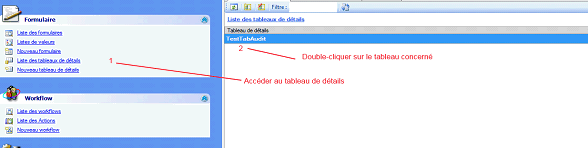
- Une fois, le tableau ouvert, accédez aux évènements en cliquant sur l’icône ci-dessous
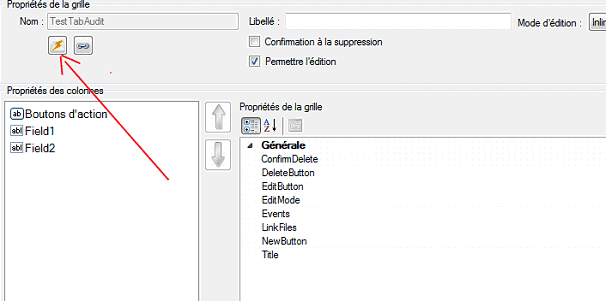
- Dans la nouvelle page qui s’ouvre, déployer « Evènements de la page » sur la gauche et sélectionner « OnInit », puis dans la partie de droite insérer le code ci-dessous :
string MessagePourAjout = "Insertion de données dans le tableau Tab Audit";
string MessagePourMiseAJour = "Modification du tableau Tab Audit";
string MessagePourSuppression = "Suppression de données dans le tableau Tab Audit";

ASPxGridView Grid = APSxGridViewTestTabAudit;

Grid.RowInserting += (sender1, e1) =>
{
    DicoStrings dicFields = new DicoStrings();
    List<StringPair> listOfPairs = new List<StringPair>();
    foreach (string key in e1.NewValues.Keys)
    {
        string newVal = e1.NewValues[key] != null ? e1.NewValues[key].ToString() : "";
        listOfPairs.Add(new StringPair(key, newVal));
    }
    Avanteam.Application.Log.ApplicationLogAction ala = new Avanteam.Application.Log.ApplicationLogAction(
    "",
    Avanteam.Application.Security.APSUser.GetUserFromSession().DisplayName,
    DateTime.Now,
    Avanteam.Application.Log.TypeLogAction.Create,
    MessagePourAjout);
    ala.DocId = APSPage.Document.IdDocument;
    ala.DocReference = reference;
    ala.DocTitle = title;
    ala.DocFormularName = formularname;
    dicFields.StringPairs = listOfPairs.ToArray();
    ala.LogDetails = dicFields;
    Avanteam.Application.Log.DataSource.ApplicationLogManagerWrapper ALMW = new Avanteam.Application.Log.DataSource.ApplicationLogManagerWrapper();
    ALMW.AddLogAction(ala);
};


Grid.RowUpdating += (sender1, e1) =>
{
    DicoStrings dicFields = new DicoStrings();
    List<StringPair> listOfPairs = new List<StringPair>();
    bool isTabModify = false;
    foreach (string key in e1.OldValues.Keys)
    {
        string oldVal = e1.OldValues[key] != null ? e1.OldValues[key].ToString() : "";
        string newVal = e1.NewValues[key] != null ? e1.NewValues[key].ToString() : "";
        if (oldVal != newVal)
        {
            isTabModify = true;
            listOfPairs.Add(new StringPair(key + "-Before", oldVal));
            listOfPairs.Add(new StringPair(key + "-After", newVal));
        }

    }
    if (isTabModify)
    {
        Avanteam.Application.Log.ApplicationLogAction ala = new Avanteam.Application.Log.ApplicationLogAction(
        "",
        Avanteam.Application.Security.APSUser.GetUserFromSession().DisplayName,
        DateTime.Now,
        Avanteam.Application.Log.TypeLogAction.Modify,
        MessagePourMiseAJour);
        ala.DocId = APSPage.Document.IdDocument;
        ala.DocReference = reference;
        ala.DocTitle = title;
        ala.DocFormularName = formularname;

        dicFields.StringPairs = listOfPairs.ToArray();
        ala.LogDetails = dicFields;
        Avanteam.Application.Log.DataSource.ApplicationLogManagerWrapper ALMW = new Avanteam.Application.Log.DataSource.ApplicationLogManagerWrapper();
        ALMW.AddLogAction(ala);
    }
};


Grid.RowDeleting += (sender1, e1) =>
{

    List<StringPair> listOfPairs = new List<StringPair>();
    foreach (object key in e1.Values.Keys)
    {
        string val = e1.Values[key].ToString();
        listOfPairs.Add(new StringPair(key.ToString(), val));
    }

    Avanteam.Application.Log.ApplicationLogAction ala = new Avanteam.Application.Log.ApplicationLogAction(
    "",
    Avanteam.Application.Security.APSUser.GetUserFromSession().DisplayName,
    DateTime.Now,
    Avanteam.Application.Log.TypeLogAction.Delete,
    MessagePourSuppression);
    ala.DocId = APSPage.Document.IdDocument;
    ala.DocReference = reference;
    ala.DocTitle = title;
    ala.DocFormularName = formularname;

    DicoStrings dicFields = new DicoStrings();
    dicFields.StringPairs = listOfPairs.ToArray();
    ala.LogDetails = dicFields;
    Avanteam.Application.Log.DataSource.ApplicationLogManagerWrapper ALMW = new Avanteam.Application.Log.DataSource.ApplicationLogManagerWrapper();
    ALMW.AddLogAction(ala);

};
-
Lorsque cela est copier, vous pouvez/devez modifier les 3 premières lignes afin d’y mettre le texte souhaiter qui apparaître dans l’audit trail.
-
Modifier ensuite « APSxGridViewTestTabAudit » en remplaçant le nom en bleu par le nom de votre tableau.
-
Attention, pour valider, vous devez d’abord cliquer sur « Ajouter » situé à gauche de la fenêtre puis « Valider » situé en bas à droite de la fenêtre.
-
Enregistrer votre tableau de détails